
Infographic
Summary
Modern TMX editors function as the primary filter for data quality, allowing for the removal of tags, the merging of large files, and the validation of segment consistency. Whether you are looking for free open-source solutions or premium professional suites, the technical capabilities vary significantly across the market.
Translation memories are usually database-type files that contain previously translated texts. They also include the texts’ formatting and other properties. Some of the properties are defined by default (e.g., source and target language, date, time, the user ID or CAT tool that performed the translation, etc.), while others the user can add as custom attributes. Each CAT tool has its way of storing translation memories. But it is essential for all language service providers to share translation memories.
This is where TMX editors come into play. The name comes from the corresponding file format. Translation Memory eXchange (TMX) is an XML-based format. By design it serves as a universal solution for exchanging translation memories between different computer-aided translation and localization tools.
In this report, we provide a comparison of TMX Editors available on the market. We hope it assists machine translation specialists. Choosing the best tool is essential to effectively clean up translation memories and prepare datasets for MT model training.
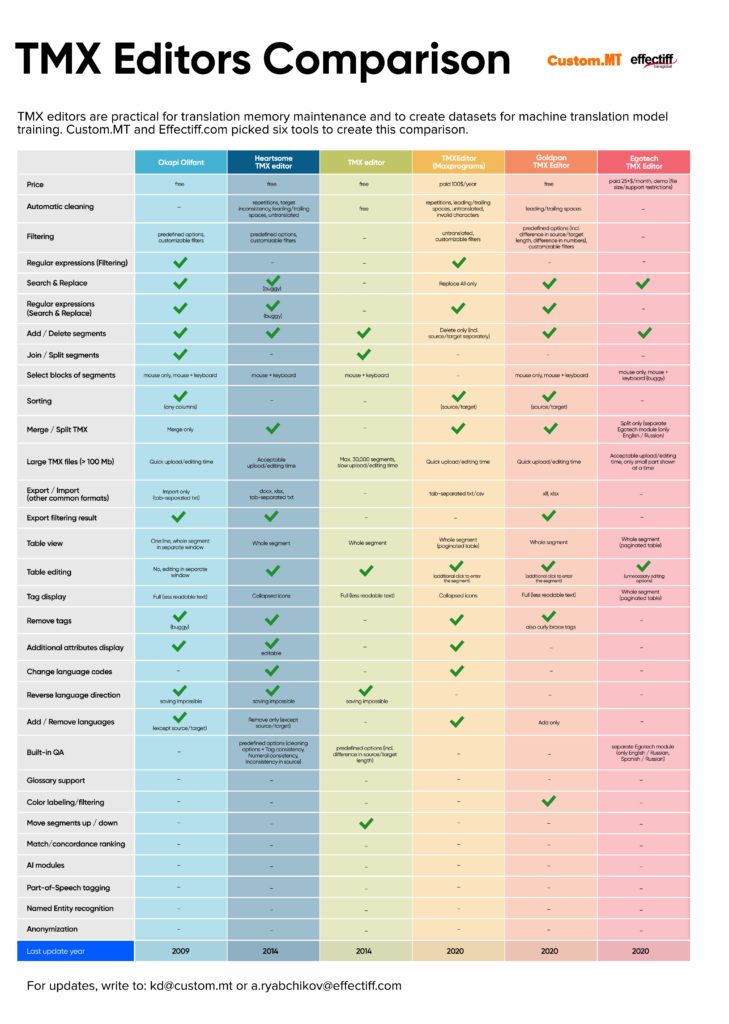
High-res infographic is available here. If you prefer a data-heavy view or need to quickly find a specific feature, we have provided the full comparison matrix in the table below.
| Feature | Okapi Olifant | Heartsome TMX editor | TMX editor | TMXEditor (Maxprograms) | Goldpan TMX Editor | Egotech TMX Editor |
|---|---|---|---|---|---|---|
| Price | free | free | free | paid 100$/year | free | paid 25+$/month, demo (file size/support restrictions) |
| Automatic cleaning | No | repetitions, target inconsistency, leading/trailing spaces, untranslated | No | repetitions, leading/trailing spaces, untranslated, invalid characters | leading/trailing spaces | No |
| Filtering | predefined options, customizable filters | predefined options, customizable filters | No | untranslated, customizable filters | predefined options (incl. difference in source/target length, difference in numbers), customizable filters | No |
| Regular expressions (Filtering) | Yes | No | No | Yes | No | No |
| Search & Replace | Yes | Yes | No | Replace All only | Yes | Yes |
| Regular expressions (Search & Replace) | Yes | Yes (buggy) | No | Yes | Yes | No |
| Add / Delete segments | Yes | Yes | Delete only (incl. source/target separately) | Yes | Yes | No |
| Join / Split segments | Yes | No | Yes | No | No | No |
| Select blocks of segments | mouse only, mouse + keyboard | mouse + keyboard | mouse + keyboard | No | mouse only, mouse + keyboard | mouse only, mouse + keyboard (buggy) |
| Sorting | Yes (any columns) | No | No | Yes (source/target) | Yes (source/target) | No |
| Merge / Split TMX | Merge only | Yes | No | Yes | Yes | Split only (separate Egotech module (only English / Russian) |
| Large TMX files (> 100 Mb) | Quick upload/editing time | Acceptable upload/editing time | Max. 30,000 segments, slow upload/editing time | Quick upload/editing time | Quick upload/editing time | Acceptable upload/editing time, only small part shown at a time |
| Export / Import (other common formats) | Import only (tab-separated txt) | docx, xlsx, tab-separated txt | No | tab-separated txt/csv | xlf, xlsx | No |
| Export filtering result | No | No | No | No | No | No |
| Table view | One line, whole segment in separate window | Whole segment | Whole segment | Whole segment (paginated table) | Whole segment | Whole segment (paginated table) |
| Table editing | No, editing in separate window | Yes | Yes | Yes (additional click to enter the segment) | Yes (additional click to enter the segment) | Yes (unnecessary editing options) |
| Tag display | Full (less readable text) | Collapsed icons | Full (less readable text) | Collapsed icons | Full (less readable text) | No |
| Remove tags | Yes (buggy) | Yes | No | Yes | Yes, also curly brace tags | No |
| Additional attributes display | Yes | Yes (editable) | No | Yes | No | No |
| Change language codes | No | Yes | No | Yes | No | No |
| Reverse language direction | Yes, saving impossible | Yes, saving impossible | Yes, saving possible | No | No | No |
| Add / Remove languages | Yes (except source/target) | Remove only (except source/target) | No | Yes | Add only | No |
| Built-in QA | No | predefined options (cleaning options + Tag consistency, Numeral consistency, Inconsistency in source) | predefined options (incl. difference in source/target length) | No | No | separate Egotech module (only English / Russian, Spanish / Russian) |
| Glossary support | No | No | No | No | No | No |
| Color labeling/filtering | No | No | No | No | Yes | No |
| Move segments up / down | No | No | Yes | No | No | No |
| Match/concordance ranking | Yes | No | No | No | No | No |
| AI modules | No | No | No | No | No | No |
| Part-of-Speech tagging | No | No | No | No | No | No |
| Named Entity recognition | No | No | No | No | No | No |
| Anonymization | No | No | No | No | No | No |
| Last update year | 2009 | 2014 | 2014 | 2020 | 2020 | 2020 |
